Docusaurus: Update from v3.4.0 to v3.7.0
Summary:
The blog post covers an upgrade from Docusaurus v3.4.0 to v3.7.0, along with tips, tricks, and key lessons learned.
Summary:
The blog post covers an upgrade from Docusaurus v3.4.0 to v3.7.0, along with tips, tricks, and key lessons learned.
Welcome to part 4 of the dual-stack series! In parts 1, 2, and 3, we walked through how to set up dual-stack networking on a Proxmox server using our Internet provider. We also showed you how to deploy RKE2 Kubernetes clusters and share both IPv4 and IPv6 services across them. Now, in the final part of the series, we are diving into some of the most commonly used features of Cilium for a home lab setup! Let’s get started!
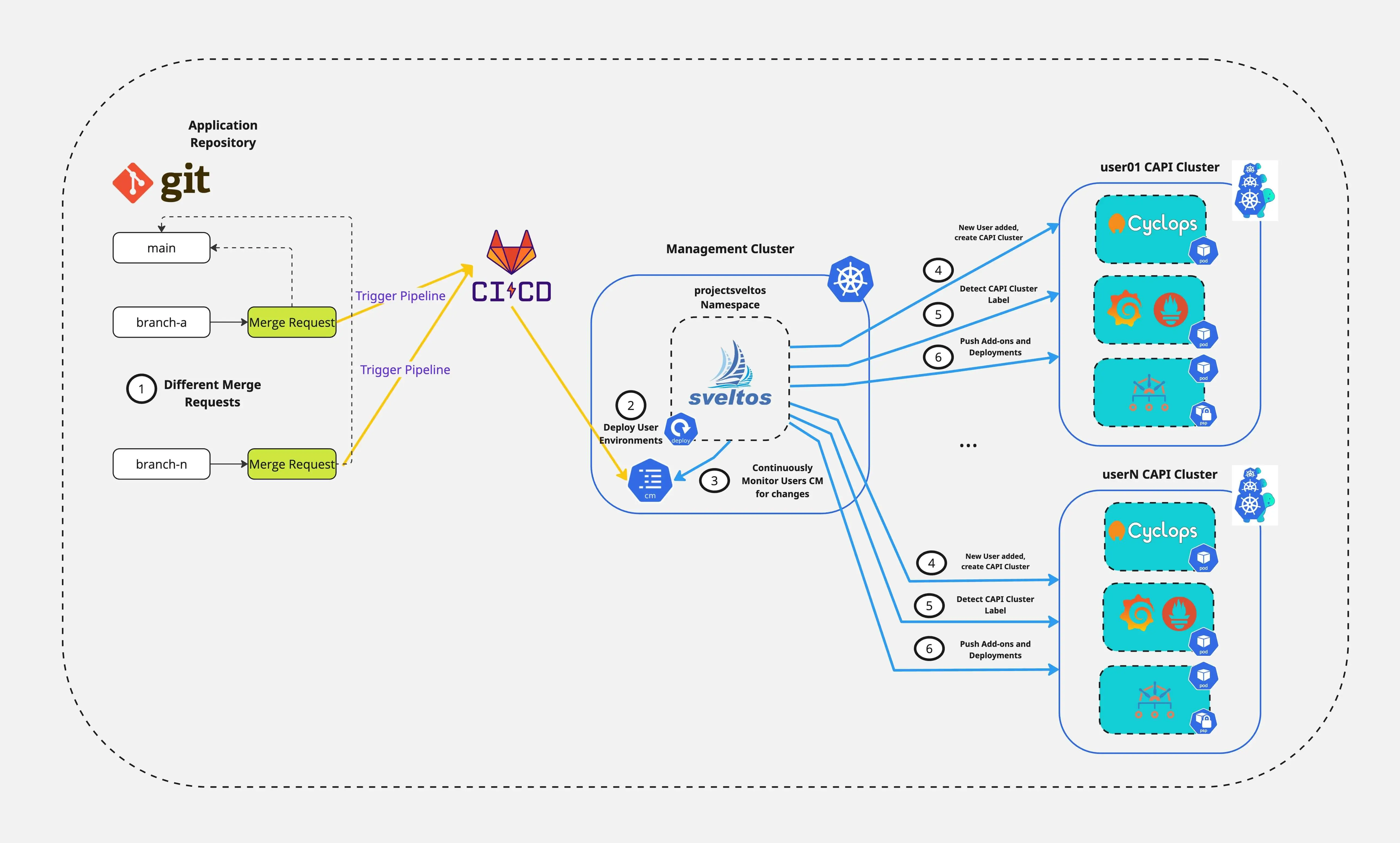
Are you ready to simplify how your Platform team spins up and down development environments while improving DevX? In this post, we show how Cluster API(CAPI), Sveltos, and Cyclops work together. They automatically create Kubernetes environments. This setup lets developers easily interact with and manage their applications. It is not magic, it is the power of Sveltos combined with the right tooling!
Welcome to part 3 of the dual-stack series! In part 1 and part 2, we discovered how to enable dual-stack on a Proxmox server using our Internet provider and deploy RKE2 clusters. In today's post, we continue our journey and enable a Cilium Cluster Mesh between two RKE2 clusters. The goal is to share IPv4 and IPv6 services between the different clusters effortlessly. Let’s dive in!
Welcome to part 2 of the dual-stack series! In part 1, we covered how to enable IPv6 Prefix allocation using pfsense on Proxmox with Fritz!Box as a home router. The setup allows virtual machines in a dedicated interface to receive an IPv4 and an IPv6 address. If you have completed part 1, you can continue with the dual-stack RKE2 setup powered by Cilium.

Welcome to the first post in the dual-stack deployments series! In part 1 of the series will set the stage for everything to come. Dual-stack is when a machine can talk both IPv4 and IPv6. Part 1 aims to guide users through enabling and configuring IPv6 prefix allocation for virtual machines in a Proxmox environment, using pfSense. The setup will be used later on for Kubernetes Deployments, Service Mesh and Global Service Sharing powered by Cilium.
I love it when work and holidays come together! In this post, I am sharing my recent travel to California during February 2025 - a bit of an off-topic post for my usual content.
Another amazing Civo Navigate conference came to an end. In today's blog post, I wanted to share some highlights from the event. I had the chance to present Sveltos and how templating alongside Validate Health can be used to deploy and update different Kubernetes add-ons and applications effortlessly.
Below, I will dive into the key highlights from the conference, provide resources about tooling I found interesting and last but not least, provide more details about the Sveltos presentation!

Welcome to part 3 of the Talos Linux Kubernetes cluster bootstrap of the Proxmox series. In today's post, we will perform changes to make the code reusable and extensible. Users can follow a GitOps approach towards Talos deployments.
We assume you already have the basic project structure. To follow along, check out part 1 and part 2 posts.

In Part 1 of the series, we showed how to install Sveltos on a Kubernetes management cluster. We also deployed Kyverno. After that, we used sveltosctl, the Sveltos Dashboard, and the Grafana Dashboard for observability. In today's post, we will take the next step and talk about the Dry-run feature, how to express a Sveltos ClusterProfile as a template and what the latest templateResourceRefs are.
It is already a year since I started getting more involved with ProjectSveltos. Over the past few months, a lot of work was put into making Sveltos not only more intuitive but also easier to use, all while preserving its core features and functionality.
This post will be split into two parts, with both sections covering the latest updates along with simple deployment examples to help you get started. So, let's dive into the world of Sveltos and explore what's new!
In a previous post, we described how to install multiple virtual clusters in a Civo cloud environment with vCluster.
Today's post updates the old deployment. It shows how to interact with virtual clusters using a registered domain hosted on Cloudflare. We use a LoadBalancer service to make this work. Let's dive into it.
In a previous post, we described installing a Rancher server on an EKS cluster with Nginx Ingress, Let's Encrypt for TLS and Cloudflare for hosting a domain.
Today's post is an update of the old deployment which includes the latest Rancher stable Helm chart release and Proxy details hoping to fix cloud-init issues. We will provide an easy-to-follow guide outlining what's new, and why updating Rancher to a later version alongside caveats or issues faced during the deployment. For this demonstration, we will use a k3s cluster hosted on Civo Cloud.

Welcome to part 2 of the Talos Linux Kubernetes cluster bootstrap on the Proxmox series.
We will enable Cilium as our CNI (Container Network Interface), use KubeProxy replacement, and set up Cilium Hubble for network observability. We will outline basic kubectl commands to evaluate the Cilium setup alongside network tests.
We assume you already have the basic project structurefrom part 1, as we will extend the configuration for Cilium. To follow along, check out the part 1 post.

I have been bootstrapping RKE2 and K3s clusters for a while now. I work on different platforms, both on-prem and in the cloud. This includes VMware, Proxmox, Nutanix, and almost every major cloud provider. This week, I have decided to take a different approach and discover something new! Bootstrap a Talos Kubernetes cluster on Proxmox using OpenTofu as the Infrastructure as Code (IaC) solution. My first interaction with Talos Linux was a couple of months back when Justin Garrison posted something about the ease of Kubernetes cluster deployment. I did not have much time back then, but here we come!
The blog post will be split into two parts. Part 1 will include a basic deployment of a Talos cluster using the out-of-the-box configuration, while Part 2 will contain the required configuration changes to use Cilium as our CNI. Get ready to roll up your sleeves and dive into the essentials of Talos Linux with OpenTofu on Proxmox.

Migration alert! For a while, I wanted to move my Docusaurus blog to a new custom domain. In the beginning, it appeared to be an overwhelming task due to time constraints and, of course, DNS! Nonetheless, after some research, I finally managed to make the migration smooth and hassle-free. This blog post is meant to save you time and frustration if you are looking to deploy a Docusaurus site on GitHub Pages with your custom domain without running into DNS problems along the way!
Funny Fact: After spending the last couple of days troubleshooting DNS issues (fun, right?), a colleague and good friend, Justus, surprised me with this awesome T-shirt! 😂
Now, let's dive into the configuration! 👇

Welcome to the first post of the brand new Kubernetes Troubleshooting Insights section! The series of blog posts will share helpful information and troubleshooting tips for issues that might appear in a Kubernetes environment. The posts focus on real-life scenarios from either test, staging, or production environments.
In today’s blog post, we’ll explore an issue with CoreDNS setup on RKE2 clusters. Cilium CNI with Hubble were enabled for this setup. Let’s jump right in!

How easy is it to handle Day-2 operations with existing CI/CD tooling? Sveltos provides the ability to perform not only Day-1 operations but also helps platform administrators, tenant administrators and other operators with Day-2 operations. For example, we can use the HealthCheck and the ClusterHealthCheck features to not only watch the health of a cluster but also collect information from the managed clusters and display them in the management cluster.
In today's blog post, we will cover a way of deploying Cilium as our CNI alongside Cilium Tetragon for observability. We will then continue with a simple TracingPolicy deployment to capture socket connections and then use Sveltos to display the tracing results back to the management cluster.
The goal of the demonstration is to showcase how Sveltos can be used for different Kubernetes cluster operations based on the use case at hand.

In previous posts, we outlined how Sveltos allows Platform and tenant administrators to streamline Kubernetes applications and add-on deployments to a fleet of clusters. In today's blog post, we will take a step further and demonstrate how easy it is to target and update a subset of resources targeted by multiple configurations. By multiple configurations, we refer to the Sveltos ClusterProfile or Profile Custom Resource Definitions (CRDs). The demonstration focuses on day-2 operations as we provide a way to update and/or remove resources without affecting production operations.
This functionality is called tiers. Sveltos tiers provide a solution for managing the deployment priority when resources are targeted by multiple configurations. They fit into current ClusterProfile/Profile definitions. They also set the deployment order and easily override behaviour.
Today, we will cover the case of updating the Cilium CNI in a subnet of clusters with the label set to tier:zone2 without affecting the monitoring capabilities defined in the same ClusterProfile/Profile.

Sveltos is on tour! Another non-technical post describing my experience at the OSSummit Europe 2024. Apart from outlining my experience, the post will include useful resources on open-source projects I learned about during the event.
About Sveltos, Gianluca Mardente and I had the chance to talk at the conference and present Sveltos and how it is used to deploy and manage different Kubernetes applications and add-ons in a multi-cloud setup.
In the sections below, I will outline my highlights of the conference and what I have learned, while later on, I will describe what we presented about Sveltos and where to locate the required resources.