vCluster Multi-Tenancy | Deploy Isolated Kubernetes Dev Environments With Helm

Summary:
It has been a while since my last post on vCluster. After working more closely with the tool, I decided to update the series and show you what changes when it comes to a local setup.
Introduction
My first interaction with vCluster was about two years ago. I needed to create local development environments with minimal resources and low setup effort. This means easy maintenance and less troubleshooting. My goal was to use Sveltos to automate the deployment of these environments when a developer joined or left the team. To achieve my goal, and after looking around at the different open-source tools, I stumbled upon vCluster.
Fast forward a year since my last blog, and I will provide updates on what changes from a vCluster point of view. The first part will be an update of the Helm chart deployment and values. On the next one, we will integrate Cilium L2 Announcements and add the vCluster Platform to the mix for ease of management and operations. Next, we will briefly discuss the Enterprise version and some use cases I covered. Finally, we will explore Sveltos and how to use the Sveltos Event Framework. This will help us automatically set up local development environments using a GitOps approach.
Lab Setup
+-------------------------+--------------+------------------+
|        Resources        |     Type     |     Version      |
+-------------------------+--------------+------------------+
|  Control Plane Cluster  |     RKE2     | v1.34.3+rke2r1   |
|      vcluster-dev       |     K8s      |     v1.36.0      |
|     vcluster-team-a     |     K8s      |     v1.36.0      |
|     vcluster-team-b     |     K8s      |     v1.36.0      |
+-------------------------+--------------+------------------+
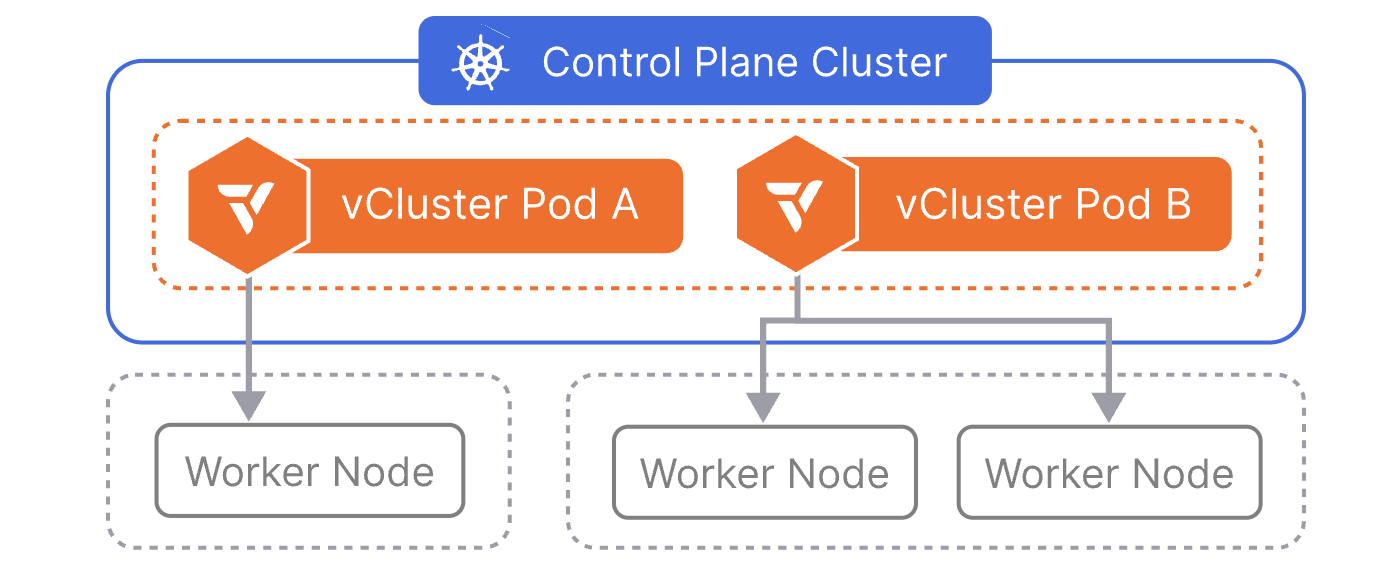
The control plane cluster is the cluster that hosts the virtualised control planes for the tenant clusters.
Prerequisites
- A Kubernetes cluster available with at least two worker nodes
- Helm installed
- kubectl installed
- Familiarity with vCluster
Scenario
“Multitenancy (or multi-tenancy) refers to a single software installation that serves multiple tenants. A tenant is a user, application, or a group of users/applications that utilize the software to operate on their own data set.”
We will start with a basic vcluster-dev vCluster in the dev namespace. Then we will update the Helm chart values and create two additional vClusters, vcluster-team-a and vcluster-team-b, in their own namespaces, where they will be scheduled on different nodes based on Kubernetes taints and tolerations. As this is a local setup, the vCluster API Server is exposed as a node port. However, in a later post, we will demonstrate how to use Cilium L2 Announcements to reach the clusters with a LoadBalancer IP address.
vcluster-dev Setup
values.yaml
A few things have changed since the last blog post. The Helm values structure has been simplified, and configuration options are now more clearly organised. Find the vCluster Helm Chart values on GitHub. The main difference with the previous setup is that a NodePort is used to expose the API Server, while the distribution is defined as k8s and not as k3s.
CoreDNS is visible within the tenant cluster, as there might be cases for a custom DNS configuration or specific external DNS resolution domains.
For storage requirements, feel free to use your preferred open-source storage solution (Longhorn, Ceph with Rook). The simplest setup will be the local-path-provisioner, which can be installed as a Helm chart, and the setup will use the local storage on each node.
controlPlane:
  distro:
    k8s:
      enabled: true
      image:
        repository: "loft-sh/kubernetes"
        tag: "v1.36.0"
      resources:
        limits:
          cpu: 100m
          memory: 256Mi
        requests:
          cpu: 40m
          memory: 64Mi
  # Enable CoreDNS services per tenant cluster
  coredns:
    enabled: true
  statefulSet:
    resources:
      limits:
        ephemeral-storage: 2Gi
        memory: 2Gi
      requests:
        ephemeral-storage: 400Mi
        cpu: 200m
        memory: 256Mi
    highAvailability:
      replicas: 1
    security:
      podSecurityContext: {}
      containerSecurityContext:
        allowPrivilegeEscalation: false
        runAsUser: 0
        runAsGroup: 0
    persistence:
      volumeClaim:
        enabled: auto
        retentionPolicy: Retain
        size: 2Gi
        storageClass: "local-path"
        accessModes: [ "ReadWriteOnce" ]
  # Service configuration for vCluster control plane access
  # The vcluster-dev will be accessible on Node IP Address:30443
  service:
    enabled: true
    annotations: {}
    labels: {}
    httpsNodePort: 30443
    kubeletNodePort: 0
    spec:
      type: NodePort
exportKubeConfig:
  context: vcluster-dev
  insecure: false
  secret:
    name: vcluster-dev
    namespace: dev
experimental:
  deploy:
    vcluster:
      manifests: |-
        ---
        apiVersion: v1
        kind: Namespace
        metadata:
          name: nginx-app
        ---
        apiVersion: apps/v1
        kind: Deployment
        metadata:
          name: nginx-dev
          namespace: nginx-app
        spec:
          selector:
            matchLabels:
              app: nginx
          replicas: 1
          template:
            metadata:
              labels:
                app: nginx
            spec:
              containers:
              - name: nginx
                image: nginx:latest
                ports:
                - containerPort: 80
        ---
        apiVersion: v1
        kind: Service
        metadata:
          name: nginx-dev
          namespace: nginx-app
        spec:
          selector:
            app: nginx
          ports:
            - protocol: TCP
              port: 80
              targetPort: 80
          type: ClusterIP
The kubeconfig of vcluster-dev will be saved as a secret named vcluster-dev in the dev namespace.
Helm Deployment
$ helm repo add loft https://charts.loft.sh
$ helm repo update
$ export KUBECONFIG=/path/to/management/kubeconfig

$ helm upgrade --install vcluster-dev vcluster \
  --namespace dev \
  --create-namespace \
  --values /the/path/to/configuration/values.yaml \
  --repo https://charts.loft.sh \
  --repository-config=''
vCluster Validation
$ helm list -n dev
NAME        	NAMESPACE	REVISION	UPDATED                                 	STATUS  	CHART          	APP VERSION
vcluster-dev	dev      	1       	2026-05-06 10:18:55.604901016 +0200 CEST	deployed	vcluster-0.34.0	0.34.0

$ kubectl get pods,svc,secret -n dev
NAME                                                        READY   STATUS    RESTARTS   AGE
pod/coredns-6dc6dfcb8f-zbrdx-x-kube-system-x-vcluster-dev   1/1     Running   0          2m
pod/nginx-dev-59c4c87bc6-4lrdc-x-nginx-app-x-vcluster-dev   1/1     Running   0          2m
pod/vcluster-dev-0                                          1/1     Running   0          2m21s

NAME                                            TYPE        CLUSTER-IP      EXTERNAL-IP   PORT(S)                         AGE
service/kube-dns-x-kube-system-x-vcluster-dev   ClusterIP   10.43.133.191   <none>        53/UDP,53/TCP,9153/TCP          2m
service/nginx-dev-x-nginx-app-x-vcluster-dev    ClusterIP   10.43.97.8      <none>        80/TCP                          2m
service/vcluster-dev                            NodePort    10.43.59.149    <none>        443:30443/TCP,10250:31662/TCP   2m21s
service/vcluster-dev-headless                   ClusterIP   None            <none>        443/TCP                         2m22s
service/vcluster-dev-node-el07-worker1          ClusterIP   10.43.207.196   <none>        10250/TCP                       2m

NAME                                        TYPE                 DATA   AGE
secret/sh.helm.release.v1.vcluster-dev.v1   helm.sh/release.v1   1      2m22s
secret/vc-config-vcluster-dev               Opaque               1      2m22s
secret/vc-vcluster-dev                      Opaque               5      2m
secret/vcluster-dev                         Opaque               5      2m
secret/vcluster-dev-certs                   Opaque               29     2m11s
Retrieve vcluster-dev Kubeconfig
Once the virtual cluster is deployed, we can retrieve the kubeconfig by decoding the configuration of the secret with the name vcluster-dev.
$ kubectl get secret vcluster-dev -n dev --template={{.data.config}} | base64 -d > /the/path/to/configuration/vcluster-dev.yaml
Open the file and update the server: https://localhost:8443 section with server: https://<NODE IP>:30443. Ensure the Node IP address defined is the one the vcluster-dev-0 pod is scheduled on. Alternatively, we can define the proxy.extraSANs option to create a valid certificate for different DNS names and IPs.
Validation
$ export KUBECONFIG=/the/path/to/configuration/vcluster-dev.yaml

$ kubectl get nodes -o wide
NAME           STATUS   ROLES    AGE    VERSION   INTERNAL-IP     EXTERNAL-IP   OS-IMAGE                KERNEL-VERSION              CONTAINER-RUNTIME
el07-worker1   Ready    <none>   134m   v1.36.0   10.43.207.196   <none>        Fake Kubernetes Image   4.19.76-fakelinux (amd64)   docker://19.3.12

$ kubectl get pods,svc -n nginx-app
NAME                             READY   STATUS    RESTARTS   AGE
pod/nginx-dev-59c4c87bc6-4lrdc   1/1     Running   0          8m13s

NAME                TYPE        CLUSTER-IP   EXTERNAL-IP   PORT(S)   AGE
service/nginx-dev   ClusterIP   10.43.97.8   <none>        80/TCP    8m12s
vcluster-team-a Setup
values.yaml
As mentioned, we will use the Kubernetes taints, tolerations, and Kubernetes labels to schedule vCluster to specific nodes based on the team we would like to onboard. The setup below is a simple example of how the vCluster configuration looks alongside the work done on the underlying control plane cluster and nodes.
controlPlane:
  distro:
    k8s:
      enabled: true
      image:
        repository: "loft-sh/kubernetes"
        tag: "v1.36.0"
      resources:
        limits:
          cpu: 100m
          memory: 256Mi
        requests:
          cpu: 40m
          memory: 64Mi
  # Define the node coreDNS should be scheduled on
  coredns:
    enabled: true
    deployment:
      nodeSelector:
        vcluster.loft.sh/team: "team-a"
      tolerations:
      - key: "vcluster.loft.sh/team"
        operator: "Equal"
        value: "team-a"
        effect: "NoSchedule"
  statefulSet:
    resources:
      limits:
        ephemeral-storage: 2Gi
        memory: 2Gi
      requests:
        ephemeral-storage: 400Mi
        cpu: 200m
        memory: 256Mi
    highAvailability:
      replicas: 1
    security:
      podSecurityContext: {}
      containerSecurityContext:
        allowPrivilegeEscalation: false
        runAsUser: 0
        runAsGroup: 0
    persistence:
      volumeClaim:
        enabled: auto
        retentionPolicy: Retain
        size: 2Gi
        storageClass: "local-path"
        accessModes: [ "ReadWriteOnce" ]
    # Scheduling vCluster Control plane pods run on nodes with the label set to team-a
    scheduling:
      nodeSelector:
        vcluster.loft.sh/team: "team-a"
      tolerations:
      - key: "vcluster.loft.sh/team"
        operator: "Equal"
        value: "team-a"
        effect: "NoSchedule"
  # Service configuration for vCluster control plane access
  # The vcluster-team-a will be accessible on Node IP Address with label team-a:30444
  service:
    enabled: true
    annotations: {}
    labels: {}
    httpsNodePort: 30444
    spec:
      type: NodePort
sync:
  # Tenants see fake nodes, pods still scheduled on correct nodes via taint and toleration
  fromHost:
    nodes:
      enabled: false
  toHost:
    pods:
      enabled: true
      enforceTolerations:
      - "vcluster.loft.sh/team=team-a:NoSchedule"
exportKubeConfig:
  context: vcluster-team-a
  secret:
    name: vcluster-team-a
    namespace: vcluster-team-a
Taints must be applied to all worker nodes in the control plane cluster before deploying vCluster. This ensures strict node isolation—team-a pods can only run on team-a nodes, and team-b pods can only run on team-b nodes.
The kubeconfig of vcluster-team-a is saved as a secret named vcluster-team-a in the vcluster-team-a namespace.
Control Plane Cluster Configuration
Connect to the control plane cluster, add the respective Kubernetes labels on the nodes we want the vcluster-team-a to use alongside the Kubernetes taints.
$ export KUBECONFIG=/path/to/Control Plane Cluster/kubeconfig

$ kubectl label node test-worker1 vcluster.loft.sh/team=team-a
$ kubectl get nodes --show-labels | grep "vcluster.loft.sh/team"

$ kubectl taint node test-worker1 vcluster.loft.sh/team=team-a:NoSchedule
$ kubectl taint node test-worker2 vcluster.loft.sh/team=team-b:NoSchedule
Helm Deployment
$ helm repo add loft https://charts.loft.sh
$ helm repo update
$ export KUBECONFIG=/path/to/Control Plane Cluster/kubeconfig

$ helm upgrade --install vcluster-team-a vcluster \
  --namespace vcluster-team-a \
  --create-namespace \
  --values /the/path/to/configuration/values.yaml \
  --repo https://charts.loft.sh \
  --repository-config=''
vCluster Validation
$ helm list -n vcluster-team-a
NAME           	NAMESPACE      	REVISION	UPDATED                                 	STATUS  	CHART          	APP VERSION
vcluster-team-a	vcluster-team-a	1       	2026-05-06 12:41:34.061614538 +0200 CEST	deployed	vcluster-0.34.0	0.34.0

$ kubectl get pods -n vcluster-team-a -o wide
NAME                                                        READY   STATUS    RESTARTS   AGE   IP            NODE           NOMINATED NODE   READINESS GATES
coredns-754d567864-5lfcg-x-kube-system-x-vcluster-team-a    1/1     Running   0          41s   10.42.0.66    test-worker1   <none>           <none>
vcluster-team-a-0                                           1/1     Running   0          70s   10.42.0.219   test-worker1   <none>           <none>
Retrieve vcluster-team-a Kubeconfig
Once the virtual cluster is deployed, we can retrieve the kubeconfig by decoding the configuration of the secret with the name vcluster-team-a.
$ kubectl get secret vcluster-team-a -n vcluster-team-a --template={{.data.config}} | base64 -d > /the/path/to/configuration/vcluster-team-a.yaml
Open the file and update the server: https://localhost:8443 section with server: https://<DEDICATED NODE IP>:30444. Follow the same validation approach as in the vcluster-dev section.
Advantages Per-Team Dedicated Nodes
- Resource Isolation: Teams cannot impact each other's resources
- Cost Tracking: Easier to track per-team infrastructure costs
- Compliance: Separate sensitive workloads onto specific nodes
- Performance: Predictable performance based on node allocation
- Failure Isolation: Node failure only affects one team assigned to the node/nodes
Conclusion
This post concludes a basic vCluster setup with two separate configurations. Feel free to explore any other possible options provided by the Helm charts to cover different use cases. In the next post, we will enable the Cilium L2 Announcements feature and integrate the free version of the vCluster Platform! Stay tuned!
Resources
✉️ Contact
If you have any questions, feel free to get in touch! You can use the Discussions option found here or reach out to me on any of the social media platforms provided. 😊 We look forward to hearing from you!
Series Navigation
| Part | Title |
|---|---|
| Part 1 | vCluster Recent Updates |
| Part 2 | Introduction to Cilium L2 Announcements and vCluster Platform |
| Part 3 | vCluster Networking and Cilium Under the Hood |
| Part 4 | vCluster and Cilium Multi-Pool Mode |
| Part 5 | vCluster and Cilium Gateway API Shared Resources |
| Part 6 | vCluster and Cilium Gateway API Shared Resources - Keycloak and Grafana Example |