Sveltos and GitOps Controllers | Orchestrate Multi-Cluster Deployments | Sveltos

Summary:
After many discussions at the KubeCon Europe in Amsterdam, I decided to start a new series covering the most commonly seen scenarios and approaches on how Sveltos and different GitOps Controllers can work together. Sveltos is not a replacement for your GitOps Controller. It is a tool to enhance and extend existing capabilities. When we talk about GitOps Controllers, we primarily refer to either ArgoCD or Flux. In the first part of the series, we will demonstrate how Sveltos fits into the Platform engineering space and, more specifically, in the Continuous Deployment (CD) part. We will provide a commonly seen scenario and explore how Sveltos can control all the deployments.
Motivation
I had the chance to meet Gianluca Mardenete (creator of Sveltos and K8Scleaner) during an internal call while working on a project. He introduced me to Sveltos almost two and a half years ago. I was impressed by the functionality and features that came out of the box, one tool to rule them all, and decided to give it a spin. Since then, I can say it not only gave me back time to work on other issues, but also made deployments way easier and scalable for us! Follow along to explore Sveltos together!
Scenario
Let’s start with a quick introduction to Sveltos. It is a Kubernetes add-on controller. It makes deploying and managing Kubernetes add-ons and applications easier using a label approach. We can use it across multiple clusters, whether on-premises, in the cloud, or in multitenant setups. Instead of configuring each cluster individually, Sveltos inverts the model: we define intent through ClusterProfiles,Profiles and labels, and clusters become consumers of that intent. Sveltos integrates very well with existing GitOps Controllers and extends its capabilities using out of the box features like advanced templating, Event Framework, and native integration with Cluster API (CAPI). To learn more about the Sveltos features, take a look at the official documentation. As mentioned in the beginning, the goal of the new series is to demonstrate the different scenarios when it comes to CD. How can someone use Sveltos capabilities when starting with deployments, and how can Sveltos fit and collaborate with other Controllers to help teams scale their operations?
In previous posts, we discussed about Flux on GitLab and how Sveltos works with Flux to provide next-level add-ons and applications across a fleet of clusters. In this post, we will focus on the scenario where Sveltos is the “brain” of our deployments. We will showcase how Sveltos can install ArgoCD and Flux to a central Kubernetes management cluster and how the same approach can be used to deploy a GitOps controller to a managed cluster that requires a GitOps Controller with a custom definition. What that means is that we will bring any Sveltos manifests stored in a git repo using an available GitOps Controller. From there, Sveltos takes over and works with the deployments based on the labelling concept.
By the end of this post, you will have a working setup where Sveltos installs and orchestrates both ArgoCD and Flux on a management cluster, and deploys the appropriate GitOps controller to managed clusters based on labels.
Lab Setup
+---------------------------+------------------+
|        Deployment         |     Version      |
+---------------------------+------------------+
|           RKE2            | v1.35.3+rke2r3   |
|         Sveltos           |     v1.8.0       |
|    ArgoCD Helm Chart      |     v9.4.17      |
|    Flux2 Helm Chart       |     v2.18.3      |
|    Flux Operator Helm     |     v0.40.0      |
+---------------------------+------------------+
GitHub Resources
The YAML outputs are not complete. Have a look at the GitHub repository.
Prerequisites
- A Kubernetes cluster acting as the management cluster
- At least two managed clusters
- Familiarity with Kubernetes manifest files
- Familiarity with ArgoCD, Flux and GitOps practices
Diagram
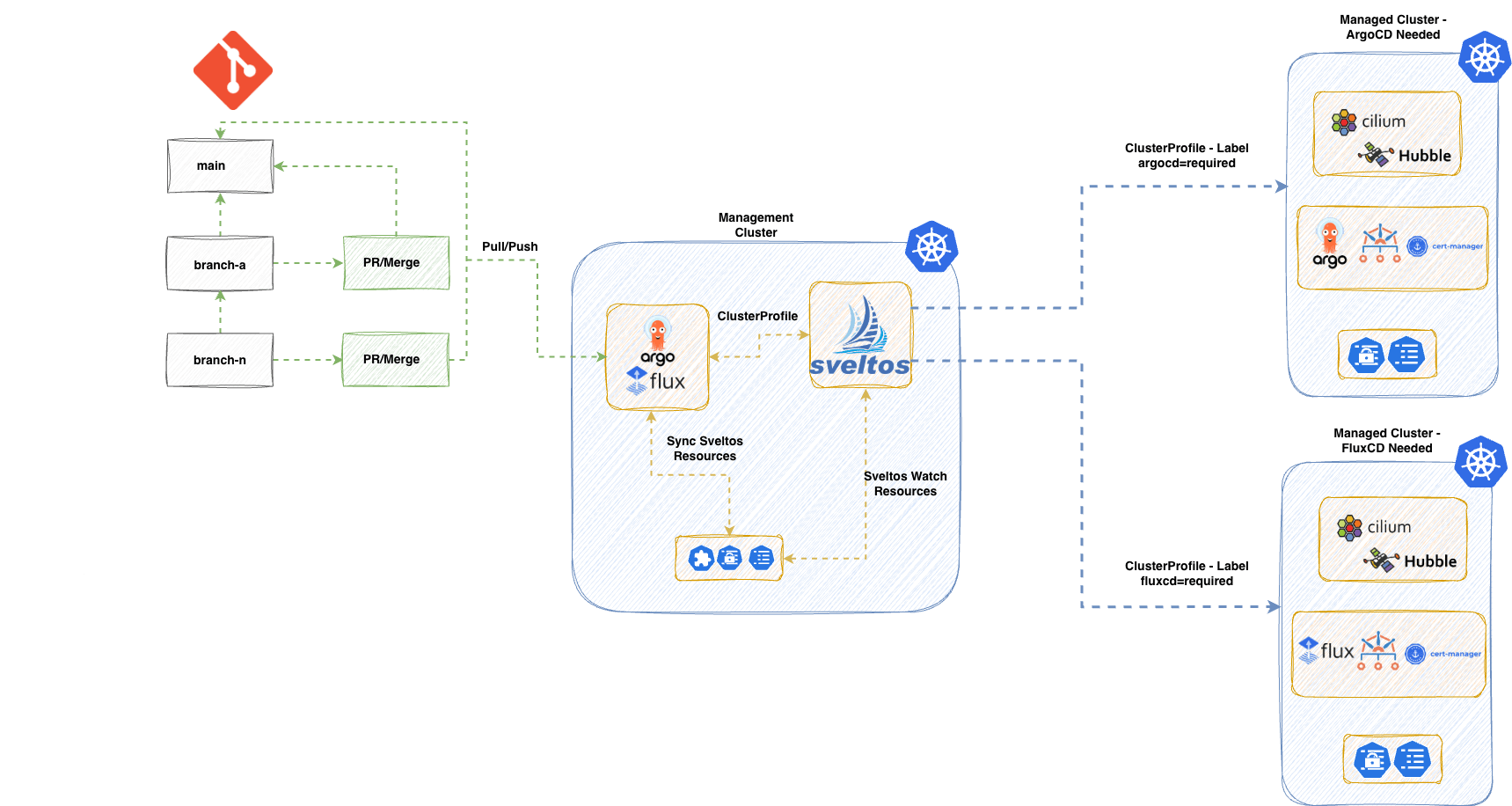
Taking a look at the diagram, we follow a classic GitOps approach. The DevOps or Platform engineering team will store the source of truth in a git or multiple git repositories. In this scenario, we instruct ArgoCD or Flux to synchronise with any repositories that hold the Sveltos resources like ClusterProfiles, Profiles, EventSource, and EventTrigger to a central management cluster. Then, Sveltos takes over the deployment of applications and add-ons using a label approach. Once a change is performed following a standard Merge or PR request, the GitOps controller will bring the updated code to the management cluster, and Sveltos will ensure the changes are performed to the affected managed clusters.
We start by installing the different GitOps Controllers to a Kubernetes management cluster (the same cluster where Sveltos is installed) using a ClusterProfile. Then, synchronise the required repositories, and Sveltos performs different deployments across different managed clusters following the Kubernetes labelling approach. For example, if a managed cluster has the label git-controller: argo, Sveltos will deploy ArgoCD to that cluster. If there is another managed cluster with the label set to git-controller: flux, Sveltos will deploy Flux to that cluster. The labelling approach provides teams with extra flexibility while keeping deployments as simple as possible. The DRY and KISS frameworks are embraced by Sveltos architecture.
My Project Structure
I like to keep things organised. When I use Sveltos as the brains of operations, I usually have the following file structure in a repository.
sveltos-resources/
├── mgmt/               # Resources for the management cluster
├── base/               # Global configurations (applied to all clusters)
│   ├── cni/
│   └── security-baseline/
├── providers/          # Provider-specific configurations (Labels: provider=aks/eks/on-prem)
│   ├── aks/
│   ├── eks/
│   └── on-prem/
├── environments/       # Env-specific configurations (Labels: env=dev/staging/prod)
│   ├── dev/
│   ├── staging/
│   └── prod/
The mgmt/ holds the Sveltos resources to be applied in the Kubernetes management cluster. The base/ directory holds the Sveltos manifests that apply to every cluster, such as the Container Network Interface (CNI) and network policies. For specialised needs, we use providers/ and environments/ folders. Instead of nesting these, we use labels to target the right Sveltos resources, allowing each cluster to automatically pick up the configurations it needs based on its specific role.
As our demonstration is way simpler, we will use the labels env: dev, env: staging, gitops: argocd, and gitops: flux to deploy specific resources to these clusters. Feel free to experiment with your own file structure based on your use cases.
Sveltos Installation
To start with the demo, we need to install Sveltos on the management cluster. I will use the Helm installation using Mode 1. Choose your preferred installation mode by reading the installation documentation.
Helm Chart Installation
$ export KUBECONFIG=<directory of the management kubeconfig>

$ helm repo add projectsveltos https://projectsveltos.github.io/helm-charts
$ helm repo update

$ helm install projectsveltos projectsveltos/projectsveltos -n projectsveltos --create-namespace --version=1.8.0
Label Management Cluster
To control resources in the management cluster using Sveltos, we will simply add the label type: mgmt to the sveltoscluster named mgmt in the mgmt namespace. The registration is done by Sveltos during installation.
$ kubectl label sveltoscluster mgmt -n mgmt type=mgmt
GitOps Controller - Management Cluster
Flux Deployment
We will use a Sveltos ClusterProfile to install the Flux-Operator as a Helm chart and include all the required resources for the desired setup. The official OCI registry is used to pull the Flux Operator Helm chart. With Sveltos, we can deploy ConfigMap and Secret resources that contain information about the cluster. That means we can add the Flux Instance, the GitLab secret, and the GitRepository resources into a ConfigMap and instruct Sveltos to deploy it to the management cluster.
Flux Operator ClusterProfile
apiVersion: config.projectsveltos.io/v1beta1
kind: ClusterProfile
metadata:
  name: flux
spec:
  clusterSelector:
    matchLabels:
      type: mgmt
  helmCharts:
  - repositoryURL: oci://ghcr.io/controlplaneio-fluxcd/charts
    repositoryName: flux-operator
    chartName: flux-operator
    chartVersion: 0.40.0
    releaseName: flux-operator
    releaseNamespace: flux-system
    helmChartAction: Install
  policyRefs:
  - name: flux-resources
    namespace: default
    kind: ConfigMap

  - kind: GitRepository
    name: sveltos-repo-sync # Define the Flux GitRepository resource name defined in the flux-resources ConfigMap
    namespace: flux-system
    path: ./resources/sveltos-manifests/
flux-resources ConfigMap
apiVersion: v1
kind: ConfigMap
metadata:
  name: flux-resources
  namespace: default
data:
  flux_resources.yaml: |
    ---
    apiVersion: fluxcd.controlplane.io/v1
    kind: FluxInstance
    metadata:
      name: flux
      namespace: flux-system
      annotations:
        fluxcd.controlplane.io/reconcile: "enabled"
        fluxcd.controlplane.io/reconcileEvery: "1h"
        fluxcd.controlplane.io/reconcileTimeout: "5m"
    spec:
      distribution:
        version: "2.x"
        registry: "ghcr.io/fluxcd"
      components:
        - source-controller
        - kustomize-controller
        - helm-controller
        - notification-controller
        - image-reflector-controller
        - image-automation-controller
      cluster:
        type: kubernetes
        size: medium
        multitenant: false
        networkPolicy: false
        domain: "cluster.local"
      commonMetadata:
        labels:
          app.kubernetes.io/name: flux
      kustomize:
        patches:
          - target:
              kind: Deployment
            patch: |
              - op: replace
                path: /spec/template/spec/nodeSelector
                value:
                  kubernetes.io/os: linux
              - op: add
                path: /spec/template/spec/tolerations
                value:
                  - key: "CriticalAddonsOnly"
                    operator: "Exists"
    ---
    apiVersion: source.toolkit.fluxcd.io/v1
    kind: GitRepository
    metadata:
      name: sveltos-repo-sync
      namespace: flux-system
    spec:
      interval: 30s
      ref:
        branch: main
      timeout: 60s
      url: https://<your domain>/<group name>/<repository name>.git
Ensure the ConfigMap with the name flux-resources is deployed to the management cluster before deploying the Sveltos ClusterProfile. The ConfigMap can contain any relevant information required for the Flux installation. Feel free to update the example and include the required details. In case authentication is required to sync a repo. Include the code listed below.
apiVersion: v1
kind: Secret
data:
  password: <BASE64 encoded string>
  username: <BASE64 encoded string>
metadata:
  name: git-creds
  namespace: flux-system
type: Opaque
---
apiVersion: source.toolkit.fluxcd.io/v1
kind: GitRepository
metadata:
  name: a-repo-sync
  namespace: flux-system
spec:
  interval: 1m0s
  ref:
    branch: main
  secretRef:
    name: git-creds
  timeout: 60s
  url: https://<your domain>/<group name>/<repository name>.git
ArgoCD Installation - Management Cluster
ArgoCD ClusterProfile
apiVersion: config.projectsveltos.io/v1beta1
kind: ClusterProfile
metadata:
  name: argocd
spec:
  clusterSelector:
    matchLabels:
      type: mgmt
  helmCharts:
  - repositoryURL: https://argoproj.github.io/argo-helm
    repositoryName: argo
    chartName: argo-cd
    chartVersion: 9.4.17
    releaseName: argocd
    releaseNamespace: argocd
    helmChartAction: Install
  policyRefs:
  - name: argo-resources
    namespace: default
    kind: ConfigMap
argo-resources ConfigMap
apiVersion: v1
kind: ConfigMap
metadata:
  name: argo-resources
  namespace: default
data:
  argo_resources.yaml: |
    ---
    apiVersion: argoproj.io/v1alpha1
    kind: Application
    metadata:
      name: sveltos-manifests
      namespace: argocd
      finalizers:
        - resources-finalizer.argocd.argoproj.io
    spec:
      project: default
      source:
        repoURL: "https://<your domain>/<group name>/<repository name>.git"
        targetRevision: HEAD
        path: resources/sveltos-manifests/
      destination:
        server: https://kubernetes.default.svc
        namespace: default
      syncPolicy:
        automated:
          selfHeal: true
          prune: true
        retry:
          limit: 5
          backoff:
            duration: 5s
            maxDuration: 3m0s
            factor: 2
      ---
      apiVersion: v1
      kind: Secret
      metadata:
        name: sveltos-repo-sync
        namespace: argocd
        labels:
          argocd.argoproj.io/secret-type: repository
      stringData:
        url: "https://<your domain>/<group name>/<repository name>.git"
Once ArgoCD is running, we create an Application resource pointing at the Sveltos resources directory in a GitHub repo. We can do this through the ArgoCD UI, via kubectl apply, or by including the Application manifest in a ConfigMap referenced by the same ClusterProfile using policyRefs. As we use Sveltos to handle the installation of ArgoCD, we take care of the deployment using a Sveltos resource.
Register Managed Clusters
The Sveltos "magic" 🪄✨ happens when we want to deploy add-ons and applications to a fleet of clusters. First, we need to register the clusters with Sveltos using either the sveltosctl or the programmatic approach. Make your choice. During the registration process, we assign specific labels to the managed clusters. For example, define the environment, whether they need a special configuration, etc.
Flux vs ArgoCD ClusterProfile
Base ClusterProfile
apiVersion: config.projectsveltos.io/v1beta1
kind: ClusterProfile
metadata:
  name: common-staging
spec:
  clusterSelector:
    matchExpressions:
    - {key: env, operator: In, values: [dev, staging]}
  helmCharts:
  - chartName: cilium/cilium
    chartVersion: 1.18.5
    helmChartAction: Install
    releaseName: cilium
    releaseNamespace: kube-system
    repositoryName: cilium
    repositoryURL: https://helm.cilium.io/
    values: |
      hubble:
        enabled: true
        peerService:
          clusterDomain: cluster.local
        relay:
          enabled: true
        tls:
          auto:
            certValidityDuration: 1095
            enabled: true
            method: helm
        ui:
          enabled: true
      nodePort:
        enabled: true
      debug:
        enabled: true
  - repositoryURL: https://charts.jetstack.io
    repositoryName: jetstack
    chartName: jetstack/cert-manager
    chartVersion: v1.16.3
    releaseName: cert-manager
    releaseNamespace: cert-manager
    helmChartAction: Install
    values: |
      crds:
        enabled: true
The base configuration will be applied to every managed cluster that has the label env: dev or env: staging defined. In this case, we would like to install a specific version of Cilium and cert-manager for certificate management.
Now, depending on whether the developers like to work with ArgoCD or Flux, we can create two different ClusterProfile resources and deploy the preferred GitOps Controller based on the git-controller label defined. Check out the configuration below for more details.
ArgoCD Controller
apiVersion: config.projectsveltos.io/v1beta1
kind: ClusterProfile
metadata:
  name: argocd
spec:
  clusterSelector:
    matchLabels:
      git-controller: argo
  helmCharts:
  - repositoryURL: https://argoproj.github.io/argo-helm
    repositoryName: argo
    chartName: argo-cd
    chartVersion: 9.4.17
    releaseName: argocd
    releaseNamespace: argocd
    helmChartAction: Install
  policyRefs:
  - name: argo-resources
    namespace: default
    kind: ConfigMap
Flux GitOps Controller
apiVersion: config.projectsveltos.io/v1beta1
kind: ClusterProfile
metadata:
  name: flux
spec:
  clusterSelector:
    matchLabels:
      git-controller: flux
  helmCharts:
  - repositoryURL: oci://ghcr.io/controlplaneio-fluxcd/charts
    repositoryName: flux-operator
    chartName: flux-operator
    chartVersion: 0.40.0
    releaseName: flux-operator
    releaseNamespace: flux-system
    helmChartAction: Install
  policyRefs:
  - name: flux-resources
    namespace: default
    kind: ConfigMap
Because we already use a GitOps Controller for our management cluster and sync any manifests with our cluster, we should not deploy these manifests to our cluster. It is the GitOps Controller's job to do so.
Updating Deployments
Once the initial deployment is complete, updating applications across the fleet follows the same GitOps workflow. When a ClusterProfile is modified, whether it is a Helm chart version, a change in the values field, or an update to the policyRefs, Sveltos detects the change and performs a Helm upgrade on every Sveltos-managed cluster matching the label selector.
For example, upgrading Cilium from 1.18.5 to 1.18.6 in the base ClusterProfile will trigger a Rolling Update across all clusters with the label env: dev or env: staging. Sveltos ensures the desired state is applied, and Kubernetes handles the pod rollout mechanics.
Because we use a GitOps Controller to sync ClusterProfile manifests to the management cluster, the update workflow looks like the following.
- Update a
ClusterProfilemanifest in Git (e.g., change chart version or values) - Merge the changes via a PR or Merge Request
- The GitOps Controller syncs the updated
ClusterProfileto the management cluster - Sveltos detects the change and performs a Helm upgrade on all matching clusters
- Kubernetes rolls out the updated workloads
No manual kubectl apply or cluster-by-cluster intervention is required. The entire update lifecycle is driven by a single Git commit.
The syncMode: Continuous in the ClusterProfile is the default value. This instructs Sveltos to correct any manual drifts on Sveltos-managed clusters. For example, if someone applies a change directly to a managed cluster, Sveltos will reconcile it back to the desired state.
Sveltos supports Progressive Rollouts. Feel free to take a look at a previous blog post.
Conclusion
In today's blog, we demonstrated a simple yet powerful and extensible way of using Sveltos as our main brain for the application and add-on deployments across a fleet of clusters. Using a labelling approach and expanding to complex deployments becomes easy using features like Sveltos templating and Event Framework, which we will cover in Parts 2 and 3.
In the next two blog posts, we will work on how Sveltos integrates with an existing Flux deployment and how we can extend Flux capabilities using Sveltos out of the box advanced features. Stay tuned.
Resources
✉️ Contact
We are here to help! Whether you have questions, or issues or need assistance, our Slack channel is the perfect place for you. Click here to join us.
👏 Support this project
Every contribution counts! If you enjoyed this article, check out the Projectsveltos GitHub repo. You can star 🌟 the project if you find it helpful.
The GitHub repo is a great resource for getting started with the project. It contains the code, documentation, and many more examples.
Thanks for reading!
Series Navigation
| Part | Title |
|---|---|
| Part 1 | Sveltos the core of deployments |
| Part 2 | Flux and Sveltos for automated Flux HelmReleases |
| Part 3 | Flux and Sveltos: Hub and spoke demo using an Event Driven Framework |