Platform Engineering on Proxmox with CAPMOX and Sveltos

Summary:
Learn how to use Sveltos to automate the creation of Cluster API (CAPI) clusters on Proxmox using the CAPMOX provider.
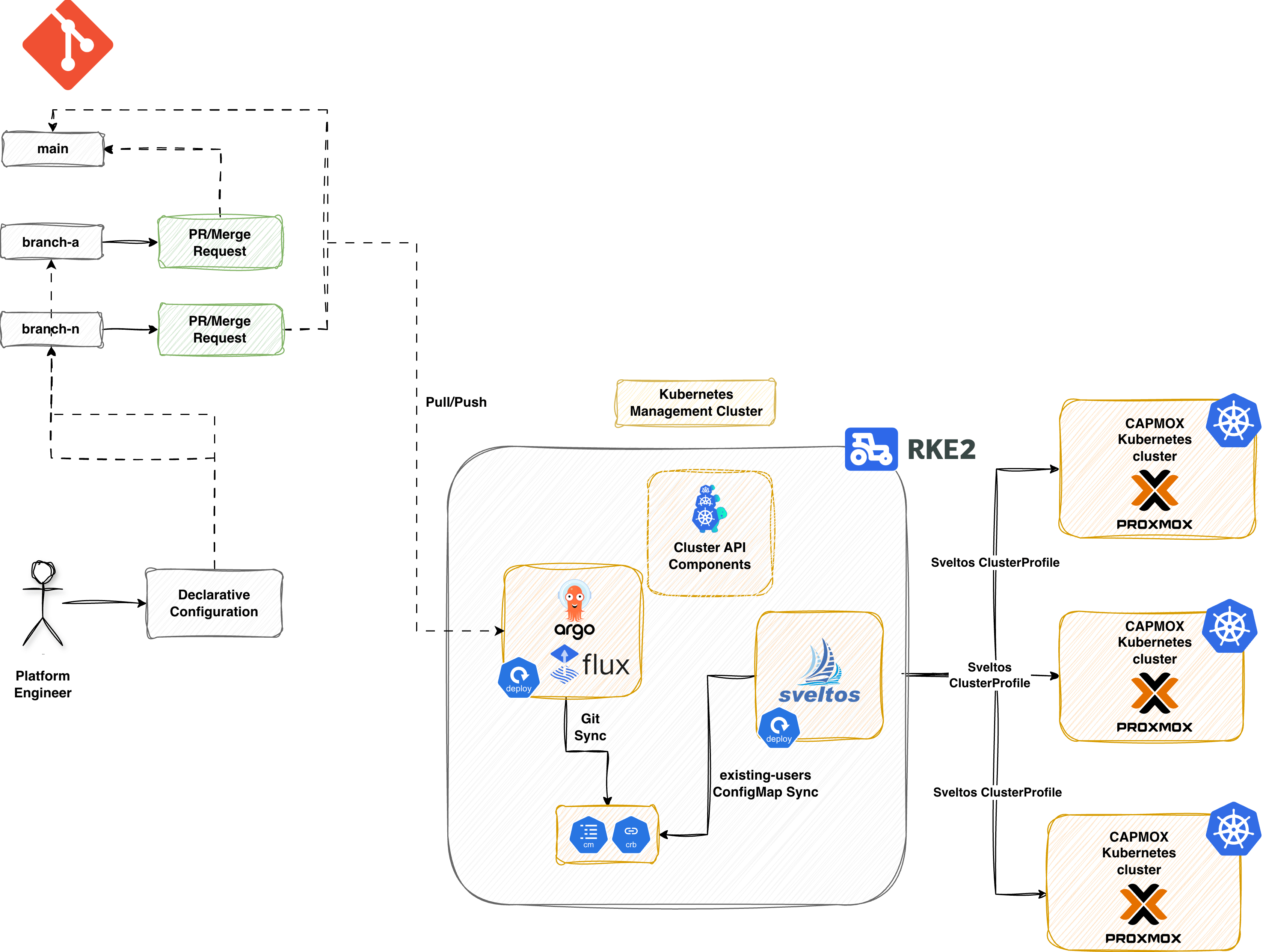
Scenario
In part 1 of the series we explored how to use the CAPMOX provider to spin up and down Kubernetes clusters on Proxmox. Cilium was the prefered Container Network Interface (CNI) for the setup.
In the initial part, we saw how to deploy a cluster step-by-step and executed the commands locally to create clusters. Today, we will explore how Sveltos using its advanced templating capabilities can automate the workflow for us using just a few manifest files.
Prerequisites
Go through the previous posts and get an understanding of how the existing setup looks like. Ensure any prerequisites are satisfied.
Lab Setup
+-----------------------------+------------------+----------------------+
|          Resources          |      Type        |       Version        |
+-----------------------------+------------------+----------------------+
|        Ubuntu Server        |       VM         |     24.04.3 LTS      |
|     Management Cluster      |      RKE2        |     v1.33.7+rke2r1   |
+-----------------------------+------------------+----------------------+

+-------------------+----------+
|      Tools        | Version  |
+-------------------+----------+
|   clusterctl      | v1.10.6  |
+-------------------+----------+

+-------------------------------+----------+
|         Deployment            | Version  |
+-------------------------------+----------+
|           CAPMOX              | v0.7.5   |
|           Cilium              | v1.18.5  |
|           Sveltos             | v1.2.1   |
+-------------------------------+----------+
GitHub Resources
The YAML outputs are not complete. Take a look at the GitHub repository for the complete code examples.
What is Sveltos?
Sveltos is a set of Kubernetes controllers deployed in a management cluster. From a management cluster, Sveltos can control add-ons and applications for a fleet of clusters. This works whether they are on-prem or in the Cloud. Sveltos supports a wide range of Kubernetes clusters and multitenant setups!
Sveltos - Management Cluster
In a Kubernetes management cluster of your preference, go ahead and install Sveltos either as a Helm chart or as a manifest file. Whatever your preferred method is.
$ export KUBECONFIG=</path/to/management/cluster/kubeconfig>

$ helm repo add projectsveltos https://projectsveltos.github.io/helm-charts
$ helm repo update

$ helm install projectsveltos projectsveltos/projectsveltos -n projectsveltos --create-namespace --version 1.2.1 --set agent.managementCluster=true # Install Sveltos in Mode 2: Centralised Agent Mode
Label Management Cluster
To apply and manage resources in the Sveltos management cluster, we will add the label type=mgmt. Sveltos will then deploy the required resources directly there.
$ export KUBECONFIG=</path/to/management/cluster/kubeconfig>

$ kubectl get sveltosclusters -A --show-labels
NAMESPACE   NAME   READY   VERSION   AGE     LABELS
mgmt        mgmt   true    v1.34.0   3m33s   projectsveltos.io/k8s-version=v1.34.0,sveltos-agent=present,type=mgmt
CAPI - Management Cluster
Ensure CAPI is already installed in the Kubernetes management cluster! In case of doubts, have a look at the official CAPI documentation.
Manifest Preparation
Our goal is to remove all manual processes from deploying self-managed Kubernetes clusters on Proxmox via CAPI. We also want to avoid managing multiple automation and templating tools simultaneously. Sveltos offers robust templating features that allow you to customise manifest files for various requirements. From there, it can provision any required add-ons or applications—all within a single, unified workflow. This results in reduced complexity, fewer dependencies, and a more efficient process for platform teams and developers.
The resources listed below are intended to be deployed exclusively through Sveltos. In production setups, manifests are usually stored in a Git repository. ArgoCD or FluxCD handles synchronisation in the management cluster where Sveltos runs.
CAPI Resources
In our GitOps setup, we will transform the manifest file created by CAPI into a Sveltos template. This Sveltos template will be filled with developer information sourced from a ConfigMap called existing-users. Next, we will process it to instantiate the CAPI template beforehand using the data contained in that ConfigMap.
Users ConfigMap
cat << EOF > cm_ext_users.yaml
apiVersion: v1
kind: ConfigMap
metadata:
  name: existing-users
  namespace: default
data:
  user01: |
    env: test
    version: "1.33.3"
    controlplaneendpoint: "10.10.10.10"
    addresses: "10.10.10.11-10.10.10.15"
    gateway: "10.10.10.1"
#   user02: |
#     env: staging
#     version: "1.33.3"
#     controlplaneendpoint: "10.10.10.16"
#     addresses: "10.10.10.17-10.10.10.22"
#     gateway: "10.10.10.1"
EOF
CAPI Manifest - Sveltos Template
Let's go ahead and convert the mentioned manifest into a Sveltos template. We will itterate through the existing-users ConfigMap and craft the file with the given information. Pay attention to the highlighted lines as they show how Sveltos templating works.
---
apiVersion: v1
kind: ConfigMap
metadata:
  name: deploy-capmox
  namespace: default
  annotations:
    projectsveltos.io/template: ok
data:
  capmox.yaml: |
    {{- if index (getResource "Users") "data" }}
      {{- range $key, $value := (getResource "Users").data }}
        {{- $user := $value | fromYaml }}
          apiVersion: cluster.x-k8s.io/v1beta1
          kind: Cluster
          metadata:
            name: {{ $key }}
            namespace: default
            labels:
              env: {{ $user.env }}
          spec:
            clusterNetwork:
              pods:
                cidrBlocks:
                - 10.44.0.0/16
            controlPlaneRef:
              apiVersion: controlplane.cluster.x-k8s.io/v1beta1
              kind: KubeadmControlPlane
              name: {{ $key }}-control-plane
            infrastructureRef:
              apiVersion: infrastructure.cluster.x-k8s.io/v1alpha1
              kind: ProxmoxCluster
              name: {{ $key }}
    ---
          apiVersion: infrastructure.cluster.x-k8s.io/v1alpha1
          kind: ProxmoxCluster
          metadata:
            name: {{ $key }}
            namespace: default
          spec:
            allowedNodes:
            - pve
            controlPlaneEndpoint:
              host: {{ $user.controlplaneendpoint }}
              port: 6443
            dnsServers:
            - {{ $user.gateway }}
            ipv4Config:
              addresses:
              - {{ $user.addresses }}
              gateway: {{ $user.gateway }}
              prefix: 24
            schedulerHints:
              memoryAdjustment: 0
    ...
    ---
    {{- end }}
    {{- end }}
The projectsveltos.io/template: ok annotation is required and instructs Sveltos to instantiate the content of the ConfigMap.
In a GitOps scenario, ArgoCD or Flux will syncronise the code to the management cluster. As we do not include the installation of ArgoCD or Flux, we will deploy the manifests to the management clusters manually.
$ export KUBECONFIG=</path/to/management/cluster/kubeconfig>

$ kubectl apply -f cm_capmox.yaml
$ kubectl apply -f cm_users.yaml
Sveltos Resources
Now that we have created the ConfigMap resources, we will use two Sveltos ClusterProfiles. First, we will deploy the required resources to the management cluster. Then, we will perform the Cilium deployment to the newly created managed clusters.
CAPI main deployment
cat << EOF > clusterprofile_capmox.yaml
---
apiVersion: config.projectsveltos.io/v1beta1
kind: ClusterProfile
metadata:
  name: deploy-capmox
spec:
  clusterSelector:
    matchLabels:
      type: mgmt
  templateResourceRefs:
  - resource:
      apiVersion: v1
      kind: ConfigMap
      name: existing-users
      namespace: default
    identifier: Users
  policyRefs:
  - name: deploy-capmox
    namespace: default
    kind: ConfigMap
EOF
$ export KUBECONFIG=</path/to/management/cluster/kubeconfig>

$ kubectl apply -f clusterprofile_capmox.yaml
Once the ClusterProfile resources are deployed in the management cluster, Sveltos will match the cluster using the defined Kubernetes label type: mgmt.
Managed Cluster - Sveltos Resources
As mentioned before, as soon as the Kubernetes API server is available, we can install the CNI of our preference. However, we can solve this manual step with a Sveltos ClusterProfile that targets the newly created clusters. As we tag the clusters using the labels test|staging, we can filter for those and apply the below Sveltos ClusterProfile resource.
Managed Cluster - Common Resources
cat << EOF > clusterprofile_managed.yaml
---
apiVersion: config.projectsveltos.io/v1beta1
kind: ClusterProfile
metadata:
  name: deploy-capmox-managed
spec:
  clusterSelector:
    matchExpressions:
    - { key: env, operator: In, values: [ test, staging ] }
  syncMode: Continuous
  helmCharts:
  - chartName: cilium/cilium
    chartVersion: 1.18.5
    helmChartAction: Install
    releaseName: cilium
    releaseNamespace: kube-system
    repositoryName: cilium
    repositoryURL: https://helm.cilium.io/
    values: |
      ipam:
        mode: "cluster-pool"
        operator:
          clusterPoolIPv4PodCIDRList:
            - "10.44.0.0/16"
          clusterPoolIPv4MaskSize: 24
        kubeProxyReplacement: true
        operator:
          replicas: 1
EOF
The YAML above will deploy Cilium as a Helm chart once the CAPI cluster is in "Ready" state. Deploy both manifest files in the management cluster.
$ export KUBECONFIG=</path/to/management/cluster/kubeconfig>

$ kubectl apply -f clusterprofile_managed.yaml
Validation
General CAPMOX Validation
$ export KUBECONFIG=</path/to/management/cluster/kubeconfig>

$ kubectl get machines,proxmoxmachines -A
NAMESPACE   NAME                                                  CLUSTER   NODENAME                     PROVIDERID                                       PHASE     AGE    VERSION
default     machine.cluster.x-k8s.io/user01-control-plane-t4g4d   user01    user01-control-plane-t4g4d   proxmox://d06df583-7812-42a3-9562-f14b90c0a089   Running   116s   v1.33.3
default     machine.cluster.x-k8s.io/user01-workers-5w4kf-92rl5   user01    user01-workers-5w4kf-92rl5   proxmox://56cb6565-fffd-4afc-825c-083dfee0411b   Running   102s   v1.33.3

NAMESPACE   NAME                                                                        CLUSTER   READY   NODE   PROVIDER_ID                                      MACHINE
default     proxmoxmachine.infrastructure.cluster.x-k8s.io/user01-control-plane-t4g4d   user01    true    pve    proxmox://d06df583-7812-42a3-9562-f14b90c0a089   user01-control-plane-t4g4d
default     proxmoxmachine.infrastructure.cluster.x-k8s.io/user01-workers-5w4kf-92rl5   user01    true    pve    proxmox://56cb6565-fffd-4afc-825c-083dfee0411b   user01-workers-5w4kf-92rl5
General Sveltos Resources
$ export KUBECONFIG=</path/to/management/cluster/kubeconfig>
$ kubectl get clusterprofile,clustersummary -A
ClusterSummary - CAPI Cluster Validation Creation
$ kubectl get clustersummary.config.projectsveltos.io/deploy-capmox-sveltos-mgmt -n mgmt -o yaml
status:
  dependencies: no dependencies
  deployedGVKs:
  - deployedGroupVersionKind:
    - Cluster.v1beta1.cluster.x-k8s.io
    - ProxmoxCluster.v1alpha1.infrastructure.cluster.x-k8s.io
    - KubeadmControlPlane.v1beta1.controlplane.cluster.x-k8s.io
    - ProxmoxMachineTemplate.v1alpha1.infrastructure.cluster.x-k8s.io
    - MachineDeployment.v1beta1.cluster.x-k8s.io
    - KubeadmConfigTemplate.v1beta1.bootstrap.cluster.x-k8s.io
    featureID: Resources
  featureSummaries:
  - featureID: Resources
    hash: lMvsHAyJdQh7knshsfindBy/8U2AGjwDmVgOQbePOzI=
    lastAppliedTime: "2026-01-26T13:16:06Z"
    status: Provisioned
ClusterSummary - Managed Cluster Validation Resources
$ kubectl get clustersummary.config.projectsveltos.io/deploy-capmox-managed-capi-user01 -o yaml
status:
  dependencies: no dependencies
  featureSummaries:
  - featureID: Helm
    hash: VNTjfOJaQalaKvh0/CrSLPjVSWq5ejmiZJB4wAwfpME=
    lastAppliedTime: "2026-01-26T13:17:14Z"
    status: Provisioned
  helmReleaseSummaries:
  - releaseName: cilium
    releaseNamespace: kube-system
    status: Managing
    valuesHash: ulFRcRWvp09XwjfSMPZCdnkdzjTTx7GniUV9dfCVybQ=
The outputs show the CAPI cluster named user01 has been set up successfully by Sveltos!
How does it work?
The logic we follow is straightforward. Ideally, a GitOps controller will be used to synchronise the Kubernetes and Sveltos resources to the management cluster. Then, Sveltos handles the creation of the clusters alongside the deployment of the add-ons and the applications, like we did with Cilium and the Azure Cloud Provider.
When a change is detected in the existing-users ConfigMap, the GitOps controller updates the management cluster. Sveltos notices this change and takes action. If, for example, we add an additional cluster, Sveltos is going to create the CAPI cluster for us. If we remove a cluster from the ConfigMap, Sveltos is going to delete the CAPI cluster. If we update the Kubernetes version in the ConfigMap for a CAPI cluster, Sveltos will apply the changes. Then, CAPI will smoothly update the cluster.
CAPI Cluster Upgrade
Previously, we talked about a CAPI cluster upgrade and how CAPI handles this situation. Since the current setup uses Sveltos, the Kubernetes cluster upgrades become seamless. We only need to update the Kubernetes version of the cluster defined in the existing-users ConfigMap, and Sveltos takes care of the rest. Sveltos will apply the changes, and CAPI will follow the standard process for updating the cluster. First, create the controlplane virutal machines with the defined version, remove the old controlplane machines and then continue with the worker nodes. The snippet shows an upgrade of a cluster from v1.33.3 to v1.33.7.
cat << EOF > cm_ext_users.yaml
---
apiVersion: v1
kind: ConfigMap
metadata:
  name: existing-users
  namespace: default
data:
  user01: |
    env: test
    version: "1.33.7"
    controlplaneendpoint: "10.10.10.10"
    addresses: "10.10.10.11-10.10.10.15"
    gateway: "10.10.10.1"
EOF
$ export KUBECONFIG=</path/to/management/cluster/kubeconfig>

$ kubectl get machines,proxmoxmachines -A
NAMESPACE   NAME                                                  CLUSTER   NODENAME                     PROVIDERID                                       PHASE          AGE     VERSION
default     machine.cluster.x-k8s.io/user01-control-plane-cptfb   user01                                                                                  Provisioning   16s     v1.33.7
default     machine.cluster.x-k8s.io/user01-control-plane-t4g4d   user01    user01-control-plane-t4g4d   proxmox://d06df583-7812-42a3-9562-f14b90c0a089   Running        4m49s   v1.33.3
default     machine.cluster.x-k8s.io/user01-workers-5w4kf-92rl5   user01    user01-workers-5w4kf-92rl5   proxmox://56cb6565-fffd-4afc-825c-083dfee0411b   Running        4m35s   v1.33.3

NAMESPACE   NAME                                                                        CLUSTER   READY   NODE   PROVIDER_ID                                      MACHINE
default     proxmoxmachine.infrastructure.cluster.x-k8s.io/user01-control-plane-cptfb   user01            pve                                                     user01-control-plane-cptfb
default     proxmoxmachine.infrastructure.cluster.x-k8s.io/user01-control-plane-t4g4d   user01    true    pve    proxmox://d06df583-7812-42a3-9562-f14b90c0a089   user01-control-plane-t4g4d
default     proxmoxmachine.infrastructure.cluster.x-k8s.io/user01-workers-5w4kf-92rl5   user01    true    pve    proxmox://56cb6565-fffd-4afc-825c-083dfee0411b   user01-workers-5w4kf-92rl5

$ kubectl get machines
NAME                         CLUSTER   NODENAME                     PROVIDERID                                       PHASE      AGE     VERSION
user01-control-plane-cptfb   user01    user01-control-plane-cptfb   proxmox://c1d04461-4741-4148-946a-fea1a354ff0b   Running    97s     v1.33.7
user01-control-plane-t4g4d   user01    user01-control-plane-t4g4d   proxmox://d06df583-7812-42a3-9562-f14b90c0a089   Deleting   6m10s   v1.33.3
user01-workers-5w4kf-92rl5   user01    user01-workers-5w4kf-92rl5   proxmox://56cb6565-fffd-4afc-825c-083dfee0411b   Running    5m56s   v1.33.3

$ kubectl get machines
NAME                         CLUSTER   NODENAME                     PROVIDERID                                       PHASE          AGE     VERSION
user01-control-plane-cptfb   user01    user01-control-plane-cptfb   proxmox://c1d04461-4741-4148-946a-fea1a354ff0b   Running        2m34s   v1.33.7
user01-workers-5w4kf-92rl5   user01    user01-workers-5w4kf-92rl5   proxmox://56cb6565-fffd-4afc-825c-083dfee0411b   Running        6m53s   v1.33.3
user01-workers-94hjx-4c7hx   user01                                                                                  Provisioning   4s      v1.33.7
Conclusion
You made it to the end of the series! In this part, we showed how to use Sveltos. The approach taken helps Platform teams to create scalable and maintainable Kubernetes clusters. We used CAPI on Proxmox and followed a GitOps approach to achieve our goal. With the proposed setup, teams own and manage the infrastructure, ensure add-ons and application deployments stay up to date on managed clusters, and maintain versioned, auditable applications and manifests. When it comes to updating add-ons across these clusters safely, have a look at Sveltos Progressive Rollouts Series for a staged promotion strategy across environments. 🚀
Related Posts
Looking to expand your Kubernetes Platform Engineering toolkit? Check out similar posts.
- CAPI with Sveltos on Azure: Automate the deployment of Cluster API (CAPI) clusters on Azure using Sveltos
- CAPI, Sveltos, and Cyclops: Extend the Cluster API (CAPI) and Sveltos workflow with Cyclops for developer self-service capabilities
Resources
👏 Support this project
Every contribution counts! If you enjoyed this article, check out the Projectsveltos GitHub repo. You can star 🌟 the project if you find it helpful.
The GitHub repo is a great resource for getting started with the project. It contains the code, documentation, and many more examples.
Series Navigation
| Part | Title |
|---|---|
| Part 1 | Introduction to CAPMOX |
| Part 2 | Troubleshooting CAPMOX deployments |
| Part 3 | CAPMOX with Sveltos |