Platform Engineering on Azure with CAPZ and Sveltos

Summary:
This is part 3 of the step-by-step guide to creating Kubernetes managed clusters on Azure Cloud using Cluster API (CAPI) and Sveltos! We will give platform teams and seasonal engineers a simple, secure, and flexible way to build Kubernetes clusters.
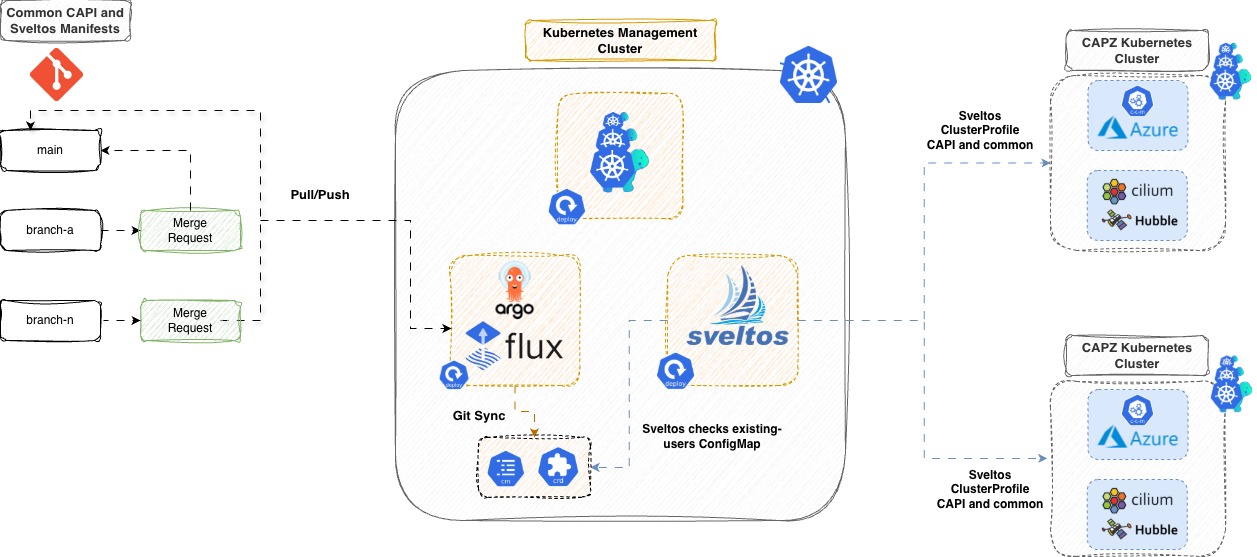
Scenario
In parts 1 and 2, we demonstrated how to use CAPI to create Kubernetes self-managed clusters in Azure. While this method works, it does not scale well. Once we have more than 10+ Kubernetes clusters, things quickly become unmanageable. What we really want is for teams to have a single pane of glass for deployments, along with an easy way to perform changes and updates to the setup.
In this post, we are taking a step further by introducing a GitOps approach for deployments. Sveltos will be at the heart of the orchestration and automation, all driven by just a few manifests. We will instruct Sveltos to watch a specific manifest where we define or keep track of our developers, users, and more. When Sveltos detects a change, it uses its advanced capabilities and takes action. It manages cluster changes, updates, or deletions without manual intervention as required. For the GitOps part, we can use tools like ArgoCD or Flux. Sveltos will take care of everything else! If you are excited as I am, follow along and experience the Sveltos magic! ✨🪄
Prerequisites
Go through the previous posts and get an understanding of how the manual setup looked. Ensure any prerequisites are satisfied.
Lab Setup
+-----------------------------+------------------+----------------------+
|          Resources          |      Type        |       Version        |
+-----------------------------+------------------+----------------------+
|        Ubuntu Server        |       VM         |     24.04.3 LTS      |
|     Management Cluster      |      Kind        |       v1.34.0        |
+-----------------------------+------------------+----------------------+

+-------------------+----------+
|      Tools        | Version  |
+-------------------+----------+
|     Sveltos       | v1.1.1   |
| Sveltos Dashboard | v1.1.2   |
|      kind         | v0.30.0  |
|   clusterctl      | v1.11.1  |
+-------------------+----------+

+-------------------------------+----------+
|         Deployment            | Version  |
+-------------------------------+----------+
| cluster-api-azure-controller  | v1.21.0  |
|      azureserviceoperator     | v2.11.0  |
|     Cloud Provider Azure      | v1.34.1  |
|           Cilium              | v1.17.7  |
+-------------------------------+----------+
GitHub Resources
Check out the GitHub repository for the full code.
Sveltos - Management Cluster
In a Kubernetes management cluster of your preference, go ahead and install Sveltos either as a Helm chart or as a manifest file. Whatever your preferred method is.
$ export KUBECONFIG=</path/to/management/cluster/kubeconfig>

$ helm repo add projectsveltos https://projectsveltos.github.io/helm-charts
$ helm repo update
$ helm install projectsveltos projectsveltos/projectsveltos -n projectsveltos --create-namespace --set agent.managementCluster=true # Install Sveltos in Mode 2: Centralised Agent Mode
Label Management Cluster
To apply resources to the Sveltos management cluster, we will add the label type=mgmt. Sveltos will then deploy the needed resources directly onto the cluster.
$ kubectl get sveltosclusters -A --show-labels
NAMESPACE   NAME   READY   VERSION   AGE     LABELS
mgmt        mgmt   true    v1.34.0   3m33s   projectsveltos.io/k8s-version=v1.34.0,sveltos-agent=present,type=mgmt
CAPI - Management Cluster
Ensure CAPI is already installed in the Kubernetes management cluster! If you do not know how, have a look at part 1 of the series or at the official CAPI documentation.
Manifest Preparation
Our aim is to eliminate any manual steps involved in deploying self-managed Kubernetes clusters on Azure using CAPI. We do not want to juggle ten different tools for automation or templating either. Sveltos comes with strong templating features. It can pre-instantiate manifest files to fit different needs. Then, it can deploy any necessary add-ons or applications. All this happens in one unified workflow. This means less hassle, fewer tools, and a more streamlined experience for platform teams and engineers.
Below are the resources we would like to deploy using Sveltos exclusively. The manifest files will be stored in a Git repository. ArgoCD or Flux will handle synchronisation in the management cluster where Sveltos is installed.
CAPI Resources
For our GitOps deployment, we will convert the manifest file generated by CAPI into a Sveltos template.
To fill the Sveltos template with user and developer information, we first define a ConfigMap named existing-users. Then, we go through it to pre-instantiate the CAPI template using the details in the ConfigMap.
Users ConfigMap
cat << EOF > cm_ext_users.yaml
---
apiVersion: v1
kind: ConfigMap
metadata:
  name: existing-users
  namespace: default
data:
  user01: |
    env: staging
    version: "1.34.0"
#   user02: |
#     env: prod
#     version: "1.34.1"
#   userN: |
#     env: test
#     version: "1.34.1"
EOF
CAPI Manifest - Sveltos Template
Let's go ahead and convert the CAPI manifest into a Sveltos template. We will go through the ConfigMap and then set up the file with the given information. Pay attention to the highlighted lines as they show how Sveltos templating works.
cat << EOF > cm_deploy_azure_capi.yaml
---
apiVersion: v1
kind: ConfigMap
metadata:
  name: deploy-azure-capi
  namespace: default
  annotations:
    projectsveltos.io/template: ok
data:
  capi-azure.yaml: |
    {{- if index (getResource "Users") "data" }}
      {{- range $key, $value := (getResource "Users").data }}
        {{- $user := $value | fromYaml }}
          apiVersion: cluster.x-k8s.io/v1beta1
          kind: Cluster
          metadata:
            name: {{ $key }}
            namespace: default
            labels:
              env: {{ $user.env }}
          spec:
            clusterNetwork:
              pods:
                cidrBlocks:
                  - 192.168.0.0/16
            controlPlaneRef:
              apiVersion: controlplane.cluster.x-k8s.io/v1beta1
              kind: KubeadmControlPlane
              name: {{ $key }}-control-plane
            infrastructureRef:
              apiVersion: infrastructure.cluster.x-k8s.io/v1beta1
              kind: AzureCluster
              name: {{ $key }}
    ---
          apiVersion: infrastructure.cluster.x-k8s.io/v1beta1
          kind: AzureCluster
          metadata:
            name: {{ $key }}
            namespace: default
          spec:
            identityRef:
              apiVersion: infrastructure.cluster.x-k8s.io/v1beta1
              kind: AzureClusterIdentity
              name: cluster-identity
            location: francecentral
            networkSpec:
              subnets:
                - name: control-plane-subnet
                  role: control-plane
                - name: node-subnet
                  role: node
              vnet:
                name: {{ $key }}-vnet
            resourceGroup: capi-test
            subscriptionID: <subscription ID>
    ...
    ---
    {{- end }}
    {{- end }}
EOF
The projectsveltos.io/template: ok annotation is required and instructs Sveltos to instantiate the content of the ConfigMap. Remember to update the Azure Subscription ID string!
CAPI AzureClusterIdentity and Service Principal - ConfigMap
cat << EOF > cm_deploy_azure_common.yaml
---
apiVersion: v1
data:
  capi-azure-common.yaml: |
    ---
    apiVersion: infrastructure.cluster.x-k8s.io/v1beta1
    kind: AzureClusterIdentity
    metadata:
      labels:
        clusterctl.cluster.x-k8s.io/move-hierarchy: "true"
      name: cluster-identity
      namespace: default
    spec:
      allowedNamespaces: {}
      clientID: <clientID>
      tenantID: <tenantID>
      type: ServicePrincipal
      clientSecret:
        name: cluster-identity-secret
        namespace: default
    ---
    apiVersion: v1
    data:
      clientSecret: <BASE64 encoded Azure App Client Secret>
    kind: Secret
    metadata:
      name: cluster-identity-secret
      namespace: default
    type: Opaque
kind: ConfigMap
metadata:
  name: deploy-azure-common
  namespace: default
EOF
Store the AzureClusterIdentity and the Secret for the Azure Service Principal in a separate ConfigMap. This way, we can use the same identity and secret for all Azure clusters when actions like create, update, and delete are executed.
The YAML outputs above are not complete. Have a look at the GitHub repository for the full details.
Deploy the manifest files in the management cluster.
$ kubectl apply -f cm_ext_users.yaml,cm_deploy_azure_common.yaml,cm_deploy_azure_capi.yaml
Sveltos Resources
Let's proceed with the Sveltos resources. To distribute them, we will use two Sveltos ClusterProfiles, one for the main CAPI deployment and one for the common tasks.
CAPI main deployment
cat << EOF > clusterprofile_main.yaml
---
apiVersion: config.projectsveltos.io/v1beta1
kind: ClusterProfile
metadata:
  name: deploy-azure-capi
spec:
  clusterSelector:
    matchLabels:
      type: mgmt
  templateResourceRefs:
  - resource:
      apiVersion: v1
      kind: ConfigMap
      name: existing-users
      namespace: default
    identifier: Users
  policyRefs:
  - name: deploy-azure-capi
    namespace: default
    kind: ConfigMap
EOF
We will deploy the ConfigMap with the name deploy-azure-capi to the Sveltos management cluster in the default namespace using the existing-users ConfigMap details as an input.
CAPI common deployment
cat << EOF > clusterprofile_common.yaml
---
apiVersion: config.projectsveltos.io/v1beta1
kind: ClusterProfile
metadata:
  name: deploy-azure-common
spec:
  clusterSelector:
    matchLabels:
      type: mgmt
  policyRefs:
  - name: deploy-azure-common
    namespace: default
    kind: ConfigMap
EOF
We will deploy the ConfigMap with the name deploy-azure-common to the Sveltos management cluster in the default namespace.
Deploy both manifest files in the management cluster.
$ kubectl apply -f clusterprofile_main.yaml,clusterprofile_common.yaml
Once the ClusterProfile resources are deployed in the management cluster, Sveltos will match the clusters using the defined Kubernetes label type: mgmt. For this demonstration, we will deploy the CAPI resources on the Kubernetes management cluster.
Managed Cluster - Sveltos Resources
In part 2 of the series, we noted that the Azure Cloud Provider and CNI plugin resources must be ready in the managed cluster. As soon as the Kubernetes API server is available, we will manually deploy the Helm charts. However, we can solve this manual step with a Sveltos ClusterProfile that targets the newly created clusters. As we tag the clusters using the labels staging|prod, we can filter for those and apply the below Sveltos ClusterProfile resource.
Managed Cluster - Common Resources
cat << EOF > clusterprofile_managed_common.yaml
---
apiVersion: config.projectsveltos.io/v1beta1
kind: ClusterProfile
metadata:
  name: deploy-capi-azure-managed
spec:
  clusterSelector:
    matchExpressions:
    - { key: env, operator: In, values: [ staging, prod ] }
  syncMode: Continuous
  helmCharts:
  - chartName: cloud-provider-azure/cloud-provider-azure
    chartVersion: 1.34.1
    helmChartAction: Install
    releaseName: cloud-provider-azure
    releaseNamespace: kube-system
    repositoryName: cloud-provider-azure
    repositoryURL: https://raw.githubusercontent.com/kubernetes-sigs/cloud-provider-azure/master/helm/repo
    values: |
      infra:
        clusterName: "{{ .Cluster.metadata.name }}"
      cloudControllerManager:
        clusterCIDR: "192.168.0.0/16"
  - chartName: cilium/cilium
    chartVersion: 1.17.7
    helmChartAction: Install
    releaseName: cilium
    releaseNamespace: kube-system
    repositoryName: cilium
    repositoryURL: https://helm.cilium.io/
    values: |
      ipam:
        mode: "cluster-pool"
        operator:
          clusterPoolIPv4PodCIDRList:
            - "192.168.0.0/16"
          clusterPoolIPv4MaskSize: 24
      kubeProxyReplacement: true
      bpf:
        masquerade: true
      hubble:
        enabled: true
        relay:
          enabled: true
        ui:
          enabled: true
EOF
The YAML above will install the cloud-provider-azure Helm chart once the CAPI cluster is in Ready state. Then, it will continue and deploy the Cilium Helm chart.
Deploy both manifest files in the management cluster.
$ kubectl apply -f clusterprofile_managed_common.yaml
Syncronise Manifests with Git
To achieve a GitOps approach, we could store all the manifest files in a Git repository and instruct ArgoCD or Flux to synchronise these repositories in the management cluster. Once a change is detected, the GitOps controller will take care of the synchronisation of the resources.
ArgoCD - Example GitRepository
---
apiVersion: argoproj.io/v1alpha1
kind: Application
metadata:
  name: my-app
  namespace: argocd
spec:
  project: default
  source:
    repoURL: https://<your Git domain>/<group name>/<repository name>
    targetRevision: HEAD
    path: "clusters/my-cluster/apps"
  destination:
    server: https://<Kubernetes management cluster>
    namespace: my-application-namespace
  syncPolicy:
    automated:
      prune: true
      selfHeal: true
    syncOptions:
      - CreateNamespace=true
Flux - Example GitRepository
---
apiVersion: v1
data:
    password: <BASE64 encoded string>
    username: <BASE64 encoded string>
kind: Secret
metadata:
    name: git-creds
    namespace: flux-system
type: Opaque
---
apiVersion: source.toolkit.fluxcd.io/v1
kind: GitRepository
metadata:
    name: staging-env
    namespace: flux-system
spec:
    interval: 1m0s
    ref:
    branch: main
    secretRef:
    name: git-creds
    timeout: 60s
    url: https://<your Git domain>/<group name>/<repository name>.git
ArgoCD and Flux will be installed in the management cluster. More details about the two tools and the installation can be found at the ArgoCD official website and at the Flux official website.
We can use Sveltos to install ArgoCD or Flux on the management cluster. Have a look at a previous blog post.
Validation
General Sveltos Resources - Management Cluster
$ export KUBECONFIG=</path/to/management/cluster/kubeconfig>

$ kubectl get clusterprofile,clustersummary -A
NAME                                                                AGE
clusterprofile.config.projectsveltos.io/deploy-azure-capi           9m58s
clusterprofile.config.projectsveltos.io/deploy-azure-common         9m58s
clusterprofile.config.projectsveltos.io/deploy-capi-azure-managed   9m58s

NAMESPACE   NAME                                                                            AGE
default     clustersummary.config.projectsveltos.io/deploy-capi-azure-managed-capi-user01   4m22s
mgmt        clustersummary.config.projectsveltos.io/deploy-azure-capi-sveltos-mgmt          9m57s
mgmt        clustersummary.config.projectsveltos.io/deploy-azure-common-sveltos-mgmt        9m57s
$ kubectl get clusters
NAME     CLUSTERCLASS   AVAILABLE   CP DESIRED   CP AVAILABLE   CP UP-TO-DATE   W DESIRED   W AVAILABLE   W UP-TO-DATE   PHASE          AGE   VERSION
user01                  False       3            0              0               2           0             0              Provisioning   13s
$ kubectl get machines,azuremachines -A
NAMESPACE   NAME                                                  CLUSTER   NODE NAME                    READY   AVAILABLE   UP-TO-DATE   PHASE          AGE     VERSION
default     machine.cluster.x-k8s.io/user01-control-plane-26sqx   user01    user01-control-plane-26sqx   True    True        True         Running        7m29s   v1.34.0
default     machine.cluster.x-k8s.io/user01-control-plane-dfcf8   user01                                 False   False       True         Provisioning   11s     v1.34.0
default     machine.cluster.x-k8s.io/user01-control-plane-wdz8p   user01    user01-control-plane-wdz8p   True    True        True         Running        4m2s    v1.34.0
default     machine.cluster.x-k8s.io/user01-md-0-rl7t7-67swp      user01    user01-md-0-rl7t7-67swp      True    True        True         Running        7m18s   v1.34.0
default     machine.cluster.x-k8s.io/user01-md-0-rl7t7-984j7      user01    user01-md-0-rl7t7-984j7      True    True        True         Running        7m18s   v1.34.0

NAMESPACE   NAME                                                                      READY   SEVERITY   REASON   STATE       AGE
default     azuremachine.infrastructure.cluster.x-k8s.io/user01-control-plane-26sqx   True                        Succeeded   7m29s
default     azuremachine.infrastructure.cluster.x-k8s.io/user01-control-plane-dfcf8                                           11s
default     azuremachine.infrastructure.cluster.x-k8s.io/user01-control-plane-wdz8p   True                        Succeeded   4m2s
default     azuremachine.infrastructure.cluster.x-k8s.io/user01-md-0-rl7t7-67swp      True                        Succeeded   7m18s
default     azuremachine.infrastructure.cluster.x-k8s.io/user01-md-0-rl7t7-984j7      True                        Succeeded   7m18s
ClusterSummary - CAPI Cluster Validation
$ kubectl get clustersummary.config.projectsveltos.io/deploy-azure-capi-sveltos-mgmt -n mgmt -o jsonpath='{.status}'
status:
  dependencies: no dependencies
  deployedGVKs:
  - deployedGroupVersionKind:
    - Cluster.v1beta1.cluster.x-k8s.io
    - AzureCluster.v1beta1.infrastructure.cluster.x-k8s.io
    - KubeadmControlPlane.v1beta1.controlplane.cluster.x-k8s.io
    - AzureMachineTemplate.v1beta1.infrastructure.cluster.x-k8s.io
    - MachineDeployment.v1beta1.cluster.x-k8s.io
    - KubeadmConfigTemplate.v1beta1.bootstrap.cluster.x-k8s.io
    featureID: Resources
  featureSummaries:
  - featureID: Resources
    hash: Pz6FTTken4eKKMTHjAvM+w/tyoiAH3X1Ma3IlT0wxZI=
    lastAppliedTime: "2025-10-02T06:53:31Z"
    status: Provisioned
ClusterSummary - Common Helm Chart Validation
$ kubectl get clustersummary.config.projectsveltos.io/deploy-capi-azure-managed-capi-user01 -o jsonpath='{.status}'
status:
  dependencies: no dependencies
  featureSummaries:
  - featureID: Helm
    hash: xMN5IxaCXVQrestDiWZcZVggYVoGaqDAh9kRde0+Oec=
    lastAppliedTime: "2025-10-02T08:07:22Z"
    status: Provisioned
  helmReleaseSummaries:
  - releaseName: cloud-provider-azure
    releaseNamespace: kube-system
    status: Managing
    valuesHash: mEO14kucLhqOMDE02POj9ivwjOTmLy72Ye91LYhh04U=
  - releaseName: cilium
    releaseNamespace: kube-system
    status: Managing
    valuesHash: Jx0YwdSGqNNV0bj+RW64cSglSralOZKsuaPvQwX8ZD8=
The outputs show that the CAPI cluster named user01 has been set up successfully by Sveltos! It includes the necessary Helm charts for the Azure Cloud Provider and Cilium.
The Helm charts are deployed once the cluster condition reason: Initialized and status: "True" is achieved.
- lastTransitionTime: "2025-10-02T08:06:08Z"
    message: ""
    observedGeneration: 2
    reason: Initialized
    status: "True"
    type: ControlPlaneInitialized
How does it work?
The logic we follow is straightforward. We use a GitOps controller to synchronise the Kubernetes and Sveltos resources to the management cluster. Then, Sveltos handles the creation of the clusters alongside the deployment of the add-ons and the application, like we did with Cilium and the Azure Cloud Provider.
When a change is detected in the existing-users ConfigMap, the GitOps controller updates the management cluster. Sveltos notices this change and takes action. If, for example, we add an additional cluster, Sveltos is going to create the CAPI cluster for us. If we remove a cluster from the ConfigMap, Sveltos is going to delete the CAPI cluster. If we update the Kubernetes version in the ConfigMap for a CAPI cluster, Sveltos will apply the changes. Then, CAPI will smoothly update the cluster.
CAPI Cluster Upgrade
Previously, we talked about a CAPI cluster upgrade and how CAPI handles this situation. Since the current setup uses Sveltos, the Kubernetes cluster upgrades become seamless. We only need to update the Kubernetes version of the cluster defined in the existing-users ConfigMap, and Sveltos takes care of the rest. Sveltos will apply the changes, and CAPI will follow the standard process for updating the cluster. The snippet below comes from an upgrade of a cluster from v1.34.0 to v1.34.1.
cat << EOF > cm_ext_users.yaml
---
apiVersion: v1
kind: ConfigMap
metadata:
  name: existing-users
  namespace: default
data:
  user01: |
    env: staging
    version: "1.34.1"
#   user02: |
#     env: prod
#     version: "1.34.1"
#   userN: |
#     env: test
#     version: "1.34.1"
EOF
$ export KUBECONFIG=</path/to/management/cluster/kubeconfig>

$ kubectl get machines,azuremachine -A
NAMESPACE   NAME                                                  CLUSTER   NODE NAME                    READY   AVAILABLE   UP-TO-DATE   PHASE          AGE   VERSION
default     machine.cluster.x-k8s.io/user01-control-plane-26sqx   user01    user01-control-plane-26sqx   True    True        False        Running        20m   v1.34.0
default     machine.cluster.x-k8s.io/user01-control-plane-dfcf8   user01    user01-control-plane-dfcf8   True    True        False        Running        13m   v1.34.0

default     machine.cluster.x-k8s.io/user01-control-plane-qnnd9   user01                                 False   False       True         Provisioning   75s   v1.34.1

default     machine.cluster.x-k8s.io/user01-control-plane-wdz8p   user01    user01-control-plane-wdz8p   True    True        False        Running        16m   v1.34.0
default     machine.cluster.x-k8s.io/user01-md-0-rl7t7-67swp      user01    user01-md-0-rl7t7-67swp      True    True        True         Running        20m   v1.34.0
default     machine.cluster.x-k8s.io/user01-md-0-rl7t7-984j7      user01    user01-md-0-rl7t7-984j7      True    True        True         Running        20m   v1.34.0

NAMESPACE   NAME                                                                      READY   SEVERITY   REASON   STATE       AGE
default     azuremachine.infrastructure.cluster.x-k8s.io/user01-control-plane-26sqx   True                        Succeeded   20m
default     azuremachine.infrastructure.cluster.x-k8s.io/user01-control-plane-dfcf8   True                        Succeeded   13m
default     azuremachine.infrastructure.cluster.x-k8s.io/user01-control-plane-qnnd9   False   Error      Failed               75s
default     azuremachine.infrastructure.cluster.x-k8s.io/user01-control-plane-wdz8p   True                        Succeeded   16m
default     azuremachine.infrastructure.cluster.x-k8s.io/user01-md-0-rl7t7-67swp      True                        Succeeded   20m
default     azuremachine.infrastructure.cluster.x-k8s.io/user01-md-0-rl7t7-984j7      True                        Succeeded   20m
Conclusion
This is the end of the series. In this part, we demonstrated how to use Sveltos and let Platform teams create scalable and maintainable Kubernetes clusters using CAPI on Azure, following a GitOps approach. Using the proposed setup, teams control the infrastructure. They also keep add-ons and application deployments current on the managed clusters. Plus, the applications and manifests are versioned and auditable.
Resources
👏 Support this project
Every contribution counts! If you enjoyed this article, check out the Projectsveltos GitHub repo. You can star 🌟 the project if you find it helpful.
The GitHub repo is a great resource for getting started with the project. It contains the code, documentation, and many more examples.